

OFFLINE BROWSER APP BUSINESS TOOL

Team Capacity Planner

Check proposed work against realistic daily availability.
Explore the example and check compatibility below.

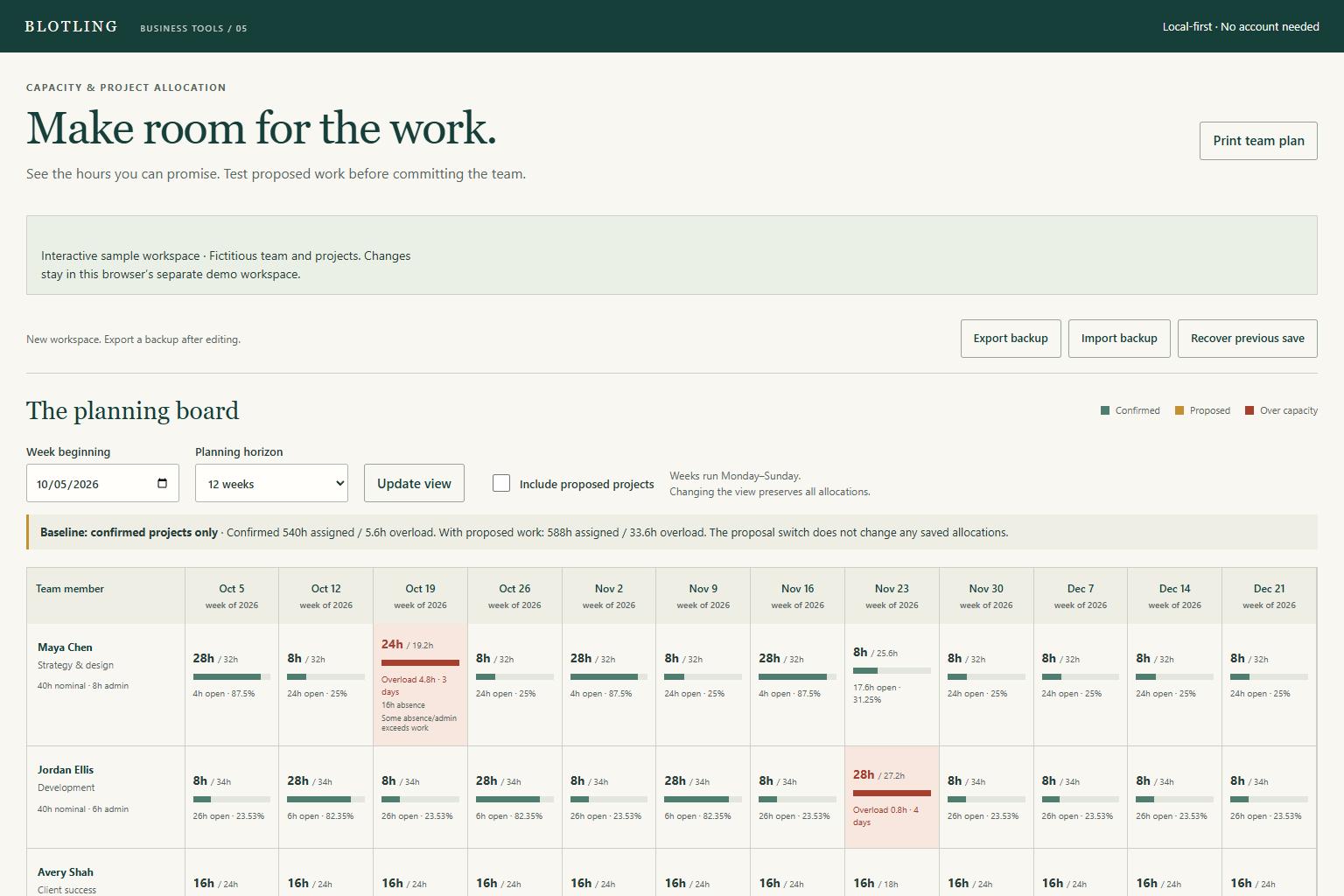
Actual Team Capacity Planner interface showing fictional sample data

Actual interface / Fictional sample data

What's included.

  1. 01

    People and working calendars

    Include weekday availability, admin hours, active dates and dated absences.

  2. 02

    Weighted effort allocation

    Distribute effort across each assignment's full date range with deterministic hundredths.

  3. 03

    Daily overload within a weekly board

    Spare time for one person or day does not erase another person's overload.

  4. 04

    Confirmed and proposed work

    Inspect a proposal scenario without changing the saved confirmed baseline.

  5. 05

    Frozen snapshots and reports

    Retain named plan snapshots, JSON backups and a daily CSV report.

A practical workflow.

  1. 01

    Set actual availability

    Add people, weekday work and admin hours, holidays and absences.

  2. 02

    Allocate effort across dates

    Assign a person and project, a full date range and total effort; review zero-capacity warnings.

  3. 03

    Check the daily conflicts

    Compare confirmed and proposed work, inspect overloaded dates, then freeze or export the plan.

Spare hours do not cancel a conflict

In a small worked example, a person has 16 available hours across a week after a holiday and an absence. Assigning 24 hours distributes 12, 6, 0, 6 and 0 hours across the weekdays, producing 8 hours of overload. The tool reports the conflicting person-days instead of hiding them inside a team average.

Fictional worked example. Check the assumptions and boundaries against your own records.

Before you buy.

REQUIREMENTS

Extract the ZIP and open tool.html in a current desktop browser. No account, installation or runtime internet connection is required. Chromium desktop and mobile viewport layouts were tested; extended data entry is best on desktop. This is a browser app, not an Excel or Google Sheets workbook.

KNOW THE SCOPE

Planning for up to 20 people, 40 projects and 500 allocations, with a 4–12 week board. No automatic scheduling, task dependencies, shared editing, payroll or compliance function. Assignments can deliberately exceed availability. Daily hours do not specify an intraday appointment window.

Actual interface / Fictional sample data

Make it yours.

Try sample scenarios